Receipts · for anyone with a self-review due
Forgot to track your wins? Rebuild your year in 90 minutes.
Receipts is a Google Sheets system for your self-review. It walks you through your own calendar, sent mail and files, shows where your proof is thin, and builds a first draft from your own lines. You finish it in your own words.
One paymentInstant downloadFix-or-refund guarantee
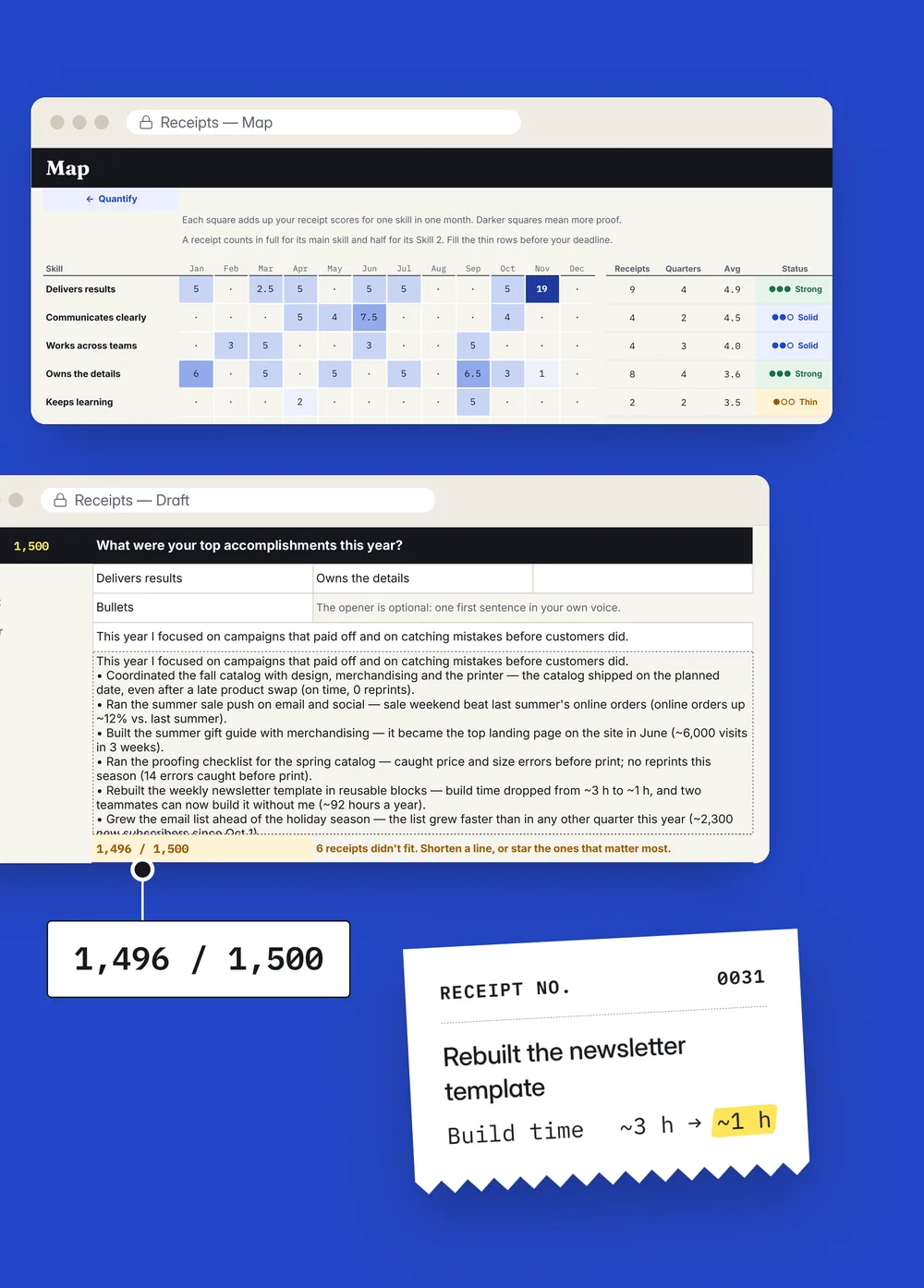
Review season, the usual way
You did the work. Now you have to prove it from memory.
The year is a blur.
You know you did good work. But January to June is gone, and you're digging through old email the night before.
Writing about yourself feels awkward.
Too modest and your work looks small. Too bold and it reads like bragging.
Your best work is invisible.
Mentoring, fixing a process, catching a problem early. Real work that's hard to put in one sentence.
The rating words are vague.
"Meets" or "exceeds"? Your company's skills and rating labels don't say what proof counts.
Your manager needs something to repeat.
When ratings are discussed, your manager speaks for you. Specific examples are easier to repeat than "worked hard all year."
The box has a limit, and it's 11 pm.
You paste your answer, the form cuts it off, and you're trimming sentences at the deadline.
The most common self-review worry is underselling yourself. Another 15% worry about sounding arrogant, and 54% ask someone to look before they submit.
Kickresume survey of 1,365 people, November 2025. Source
Field study
Your self-review can shape your rating. At one multinational firm, managers' ratings leaned toward employees' self-ratings. In the year a glitch hid self-reviews from managers, average ratings fell.
Bohnet, Hauser & Kristal, Journal of Economic Behavior & Organization, 2025. Source
A different starting point
Receipts starts where most people are: a blank page and a deadline.
Most win trackers assume you logged your wins all year. Receipts helps you find them now, in places you already have: your calendar, sent mail, chats, files and tickets. Then it sorts your proof by your company's skills and turns it into a first draft you can rewrite.
How it works
Three steps, one evening and one morning.
Rebuild your year
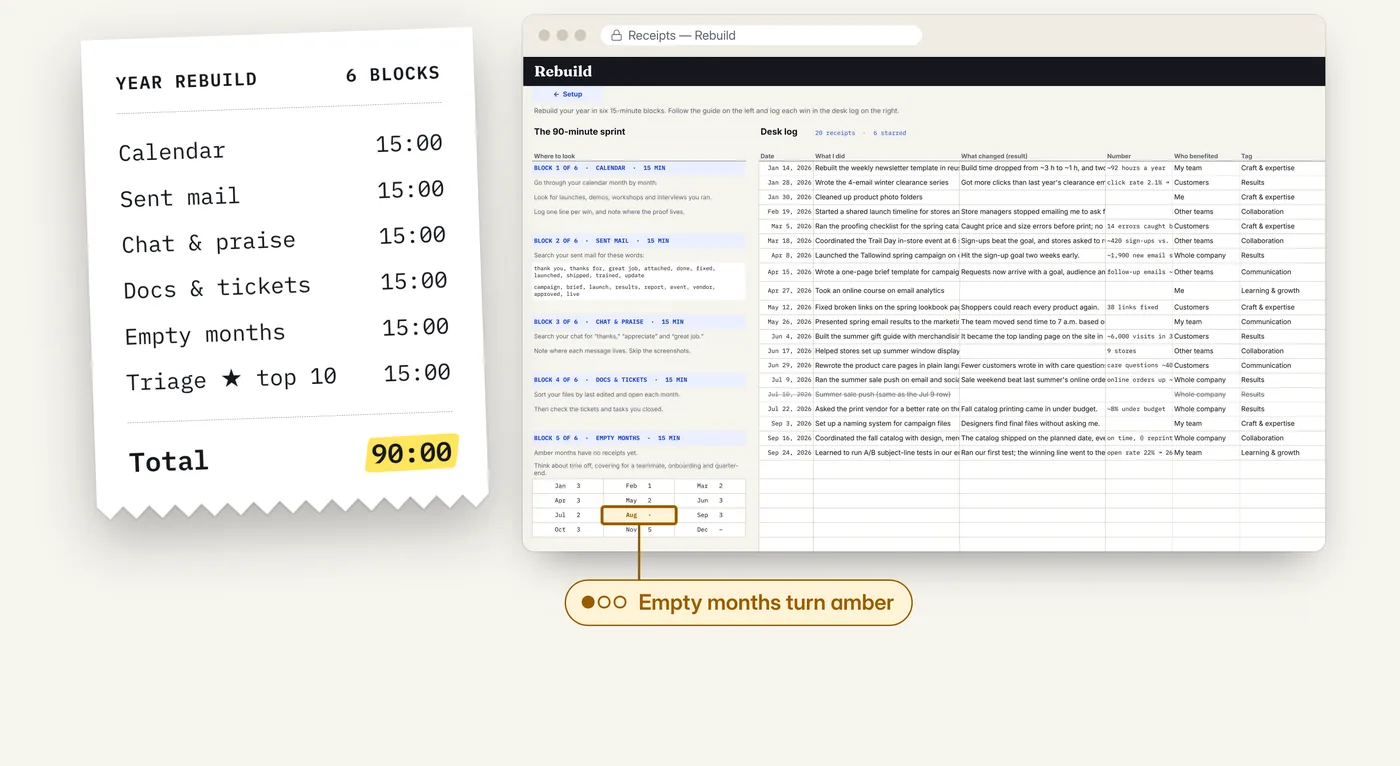
Six 15-minute search blocks: calendar, sent mail, chat and praise, docs and tickets, empty months, and your top 10. Each block comes with words to search for your role.
- One line per win: what you did, what changed, a number
- Months with nothing logged turn amber, so you know where to look next
- Works even if you tracked nothing all year
See where your proof is strong, thin or missing
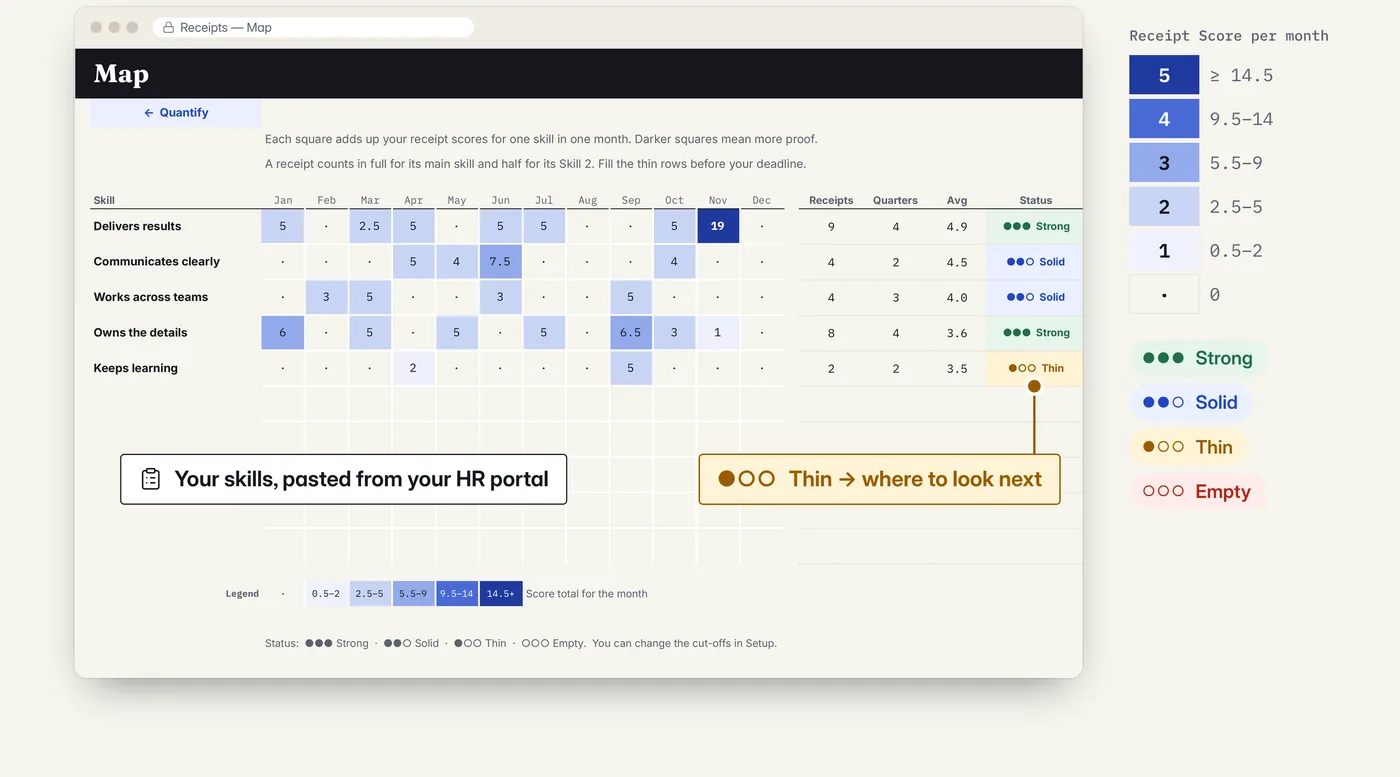
Paste your company's skills and rating scale, or pick a preset. A heat map shows your proof by skill and by month, so you fix the gaps before your manager sees them.
- Up to 10 skills, your own rating labels
- A "fill the gap" tip for every thin spot
- 12-month or 6-month period
Draft your self-review from your own lines
Pick your review questions. Receipts puts your strongest receipts first and builds a first draft from what you wrote. If your form has a character limit, the draft stops at it. Then you rewrite it in your own voice.
- Live character counter for every answer
- Limit Ruler finds your form's limit in seconds
- Nothing invented: every sentence comes from your receipts
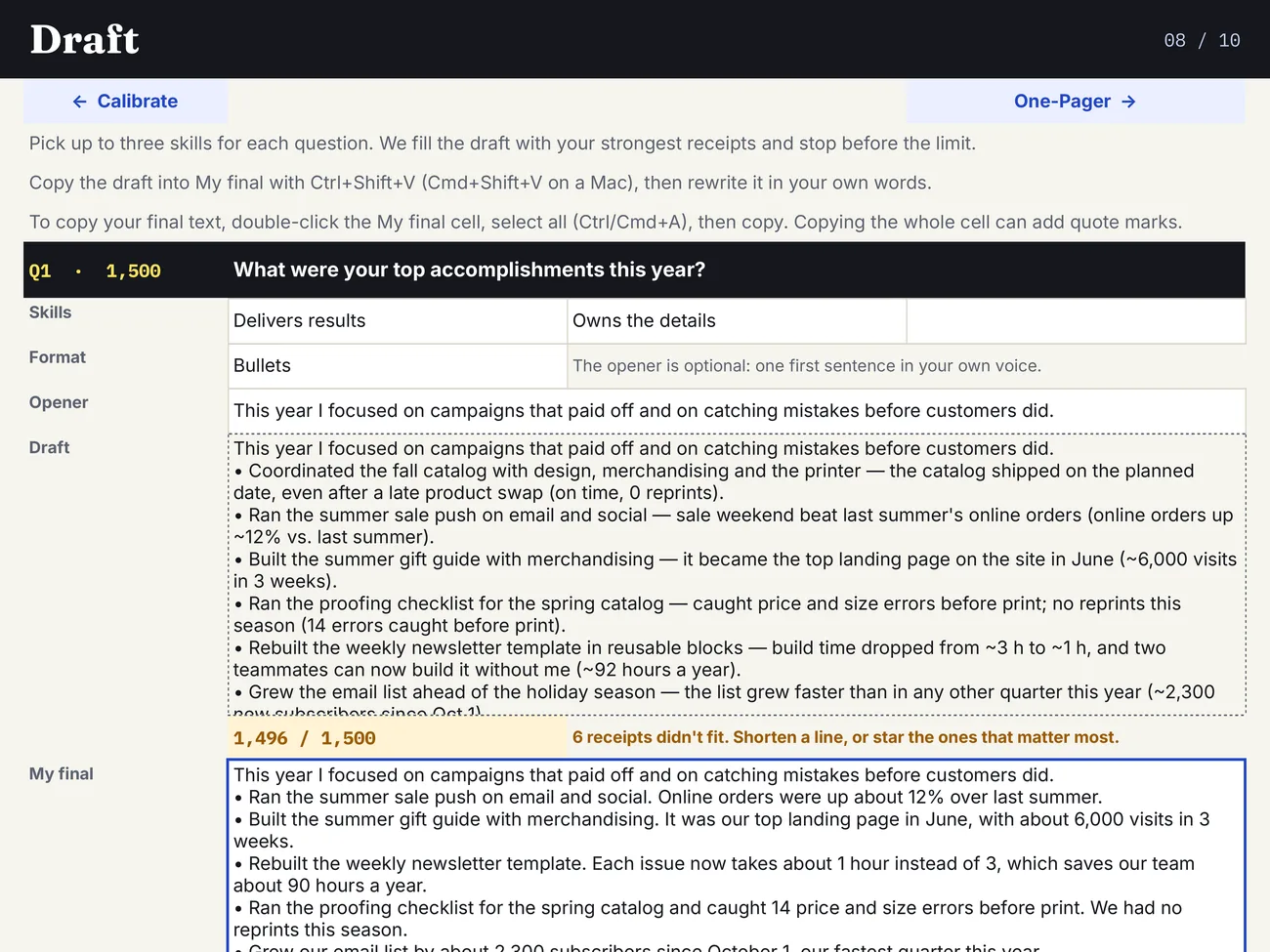
Real screen from the marketing coordinator example (fictional).
Quantify
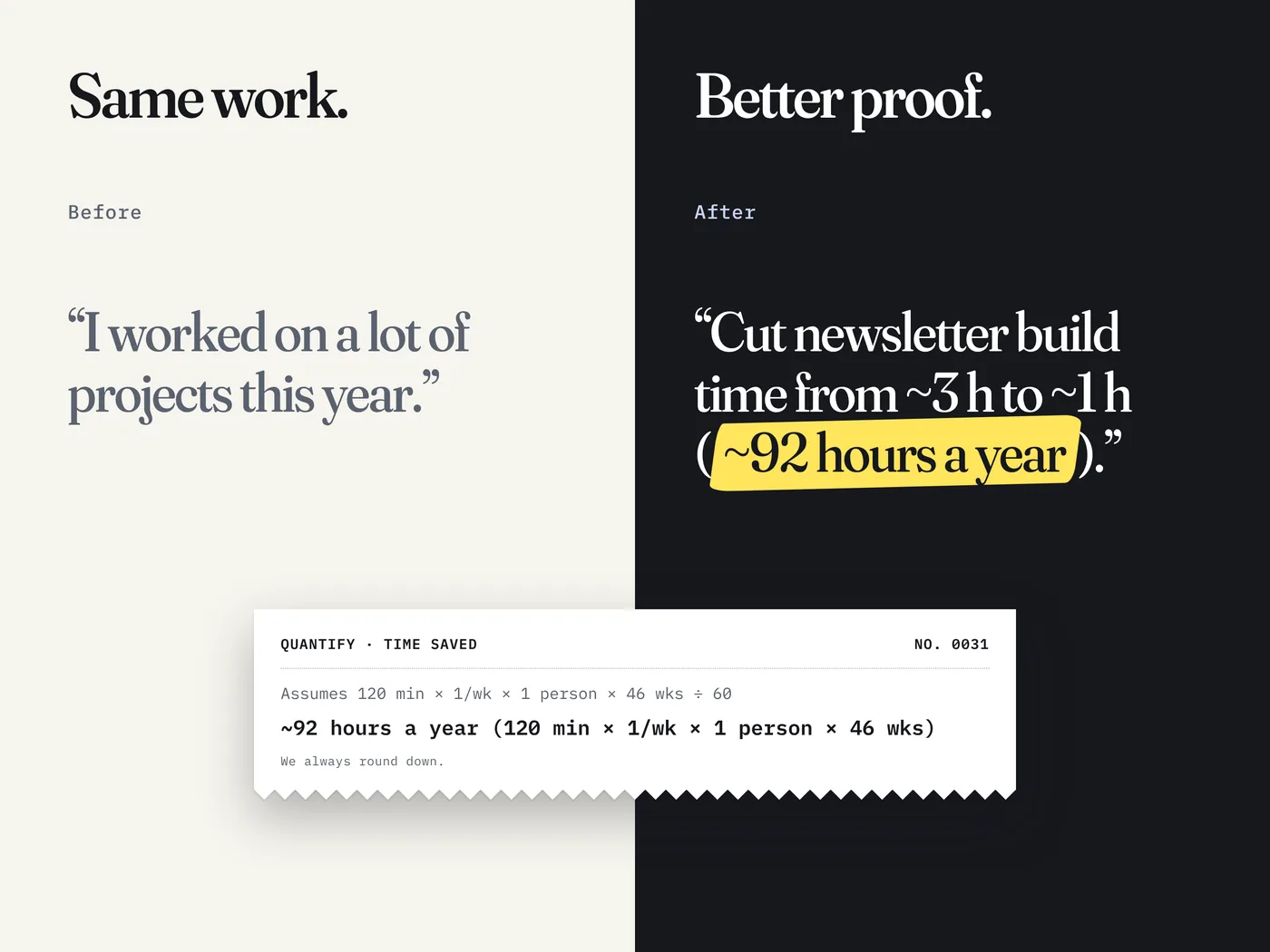
Same work. Better proof.
"I worked on a lot of projects" doesn't help anyone. Quantify turns hard-to-measure work into careful numbers your manager can repeat. It always rounds down, so every number holds up if someone asks.
After the form
Walk into the review meeting ready.
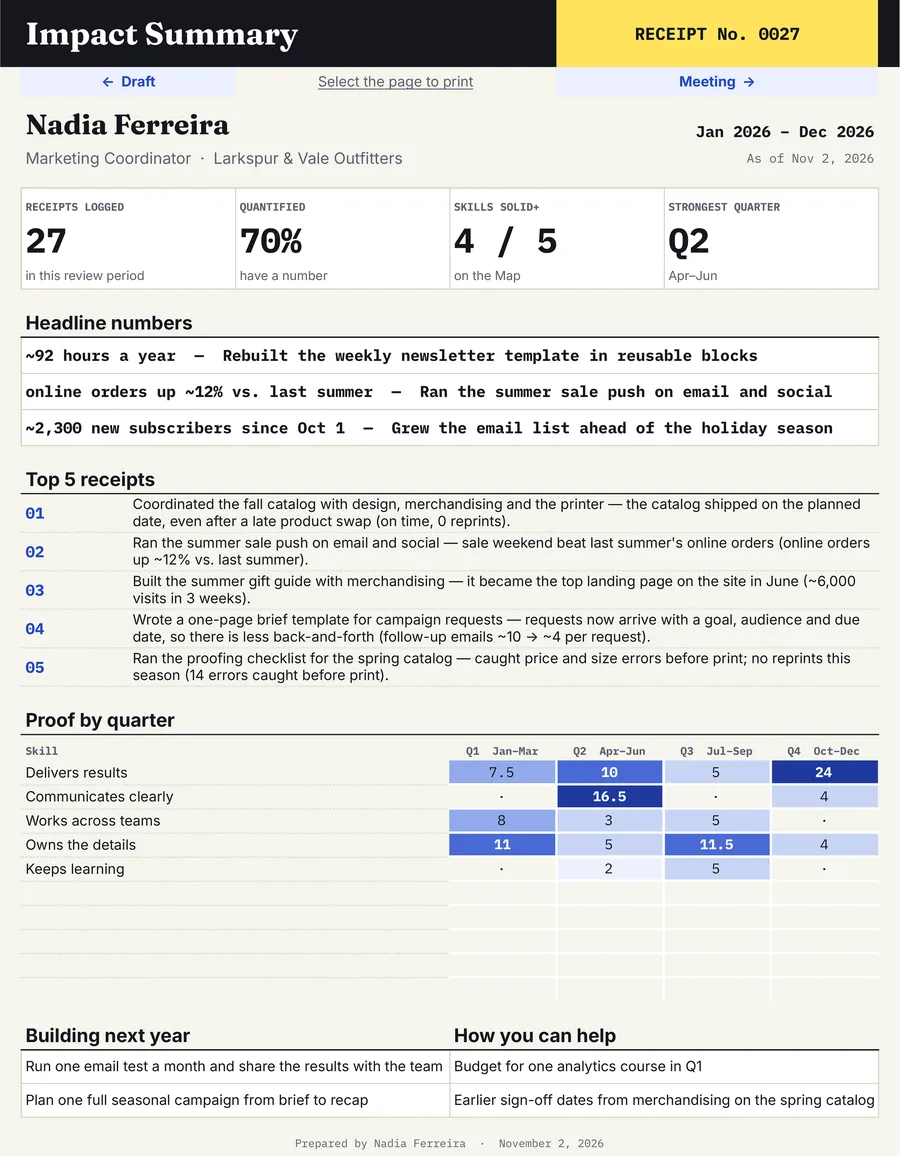
One-Pager for your manager
Your headline numbers, top 5 receipts and proof by quarter on one page. Easy to forward, easy to reuse. Prints on one Letter page.
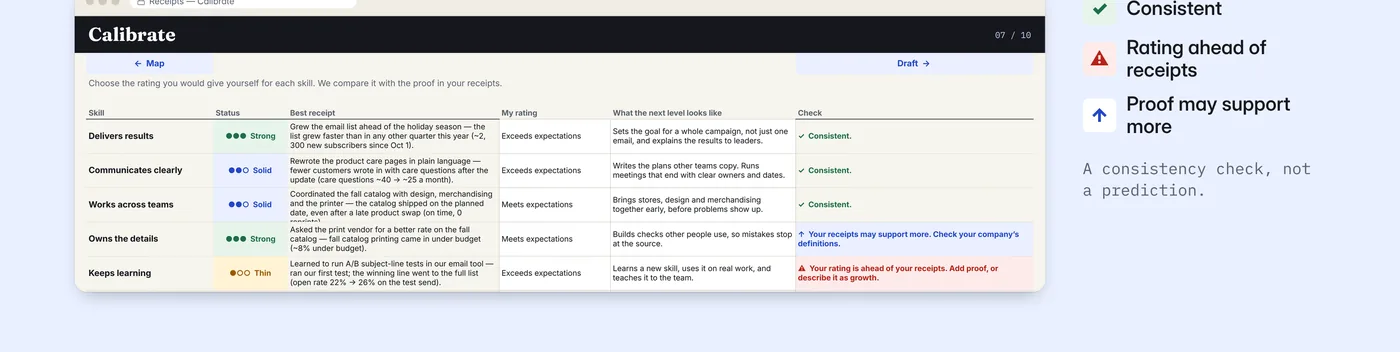
Calibrate: is your rating backed by proof?
Pick the rating you'd give yourself for each skill. Receipts compares it with your proof and flags where you're ahead of your evidence, before you submit.
Meeting prep
Lead with your top three, name one growth area and what you're doing about it, make two clear asks, and send a short recap email after.
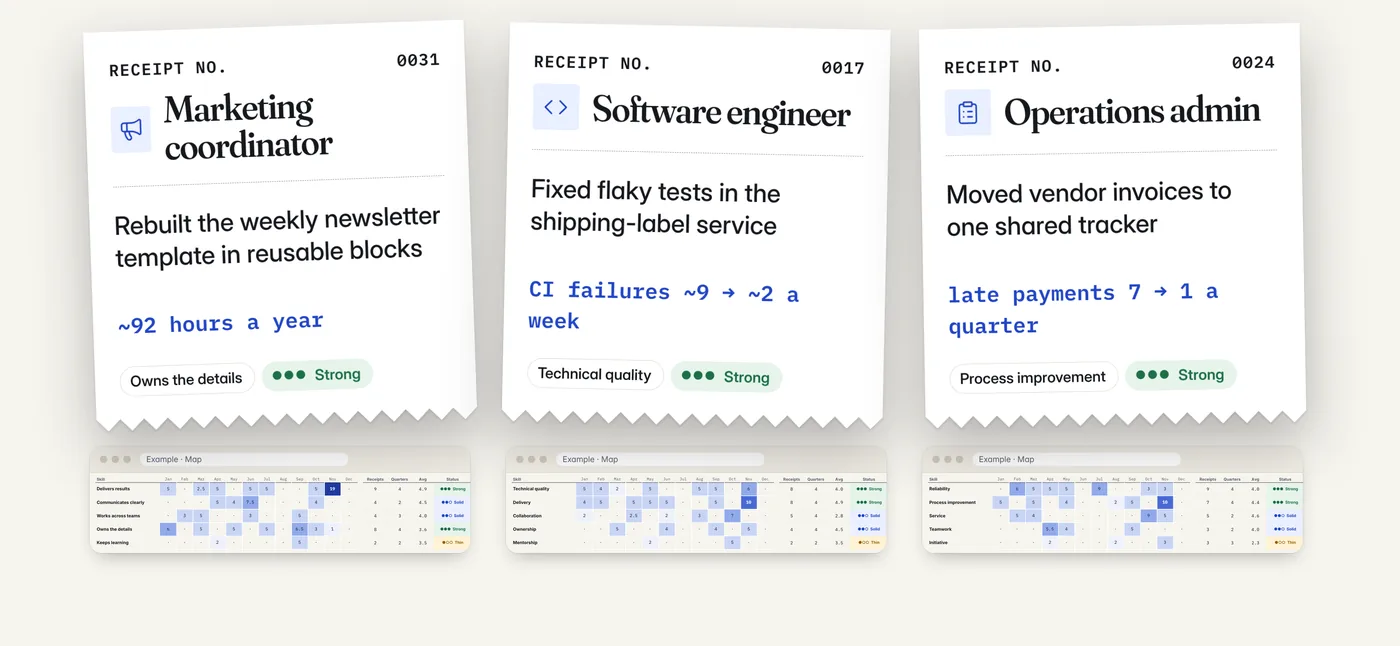
Three filled examples
Marketing coordinator, software engineer and operations admin, all fictional. Open the one closest to your job and see a finished year before you start yours.
All year
Then keep it going. Log a win in about 30 seconds.
A free Google Form on your phone's home screen. No app to buy. Next review season starts with proof, not a blank page.
- Tap the icon on your home screen
- Write one line and add a number
- It lands in your Receipts
What's inside
Everything for review season.
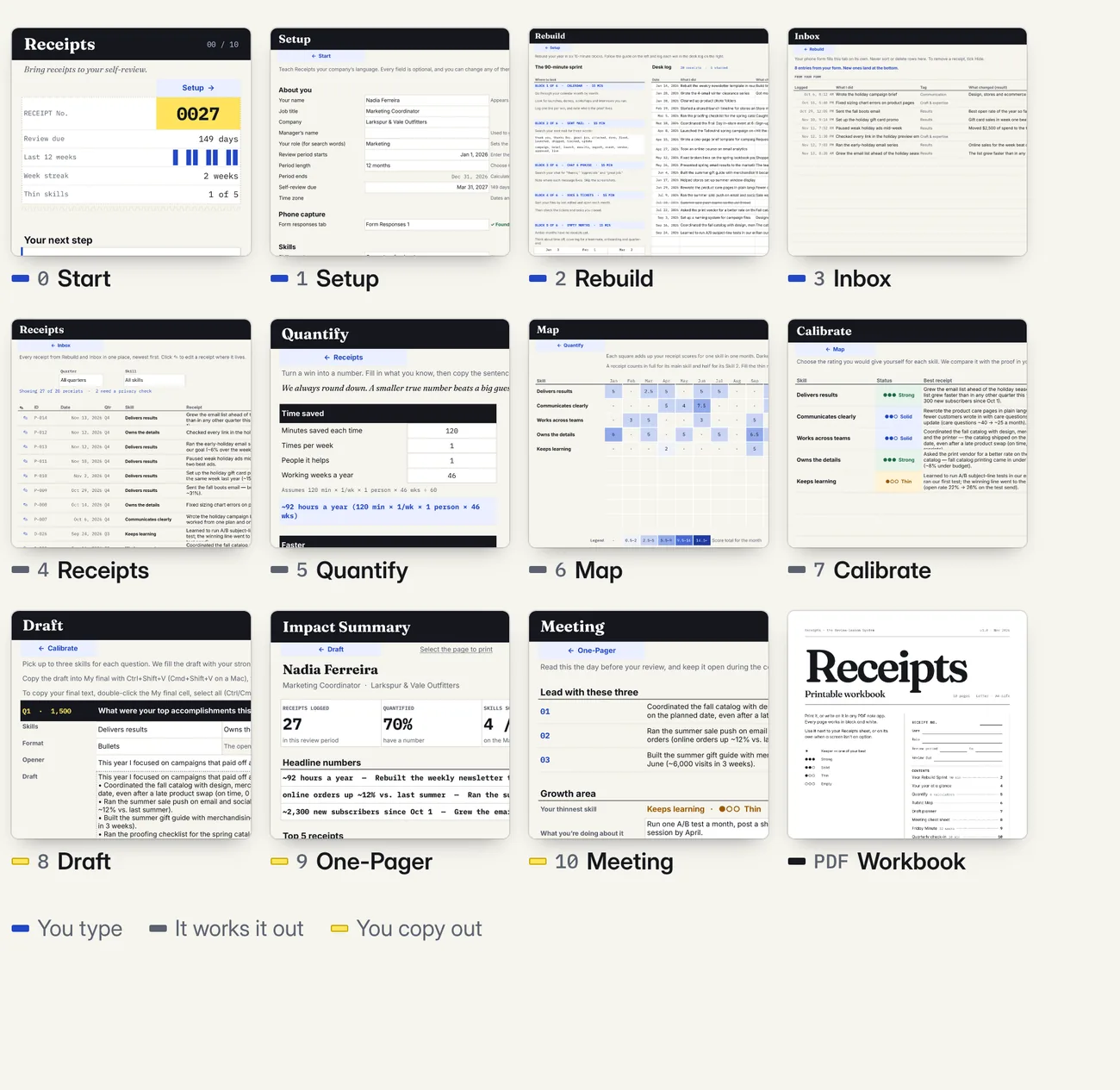
- Google Sheets system, 11 tabs. Your own private copy.
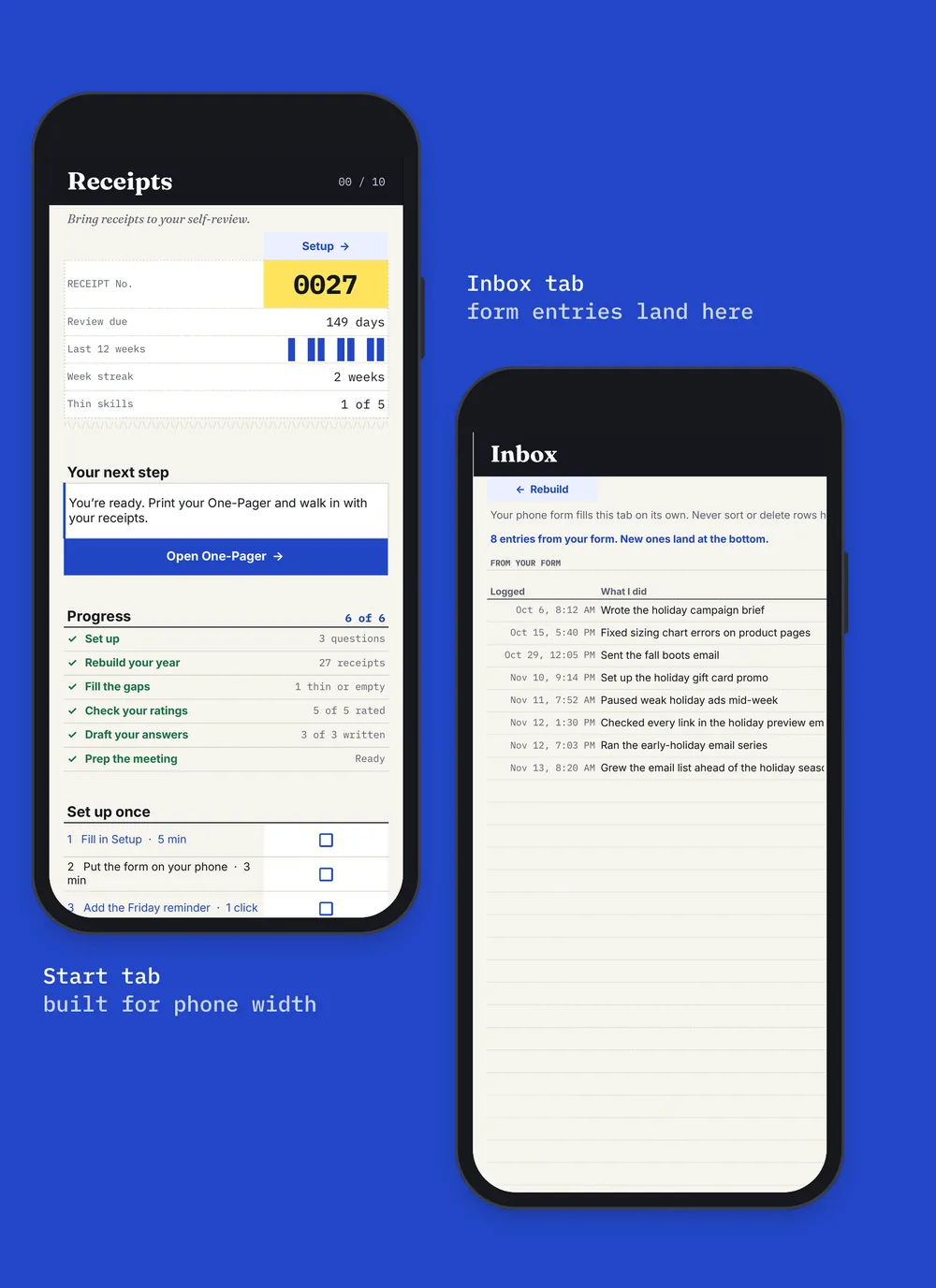
- Mission Control start screen. Your next step, progress and a countdown to your deadline.
- Phone form. Free Google Forms. Log a win in about 30 seconds.
- Year Rebuild. Six search blocks with words to search for your role.
- Quantify. Six calculators that always round down.
- Map. Heat map of your proof by skill and month.
- Calibrate. Check your self-rating against your proof.
- Draft. A first draft per question, live counter, Limit Ruler.
- One-Pager and Meeting. A summary for your manager, talking points, two asks, a recap email.
- 6-month mode. For mid-year reviews.
- 3 filled examples. Marketing, engineering, operations. All fictional.
- Start Here PDF and printable workbook. 2 pages and 10 pages, US Letter.
- Free v1.x updates. Download again anytime.
Privacy
Your data stays yours.
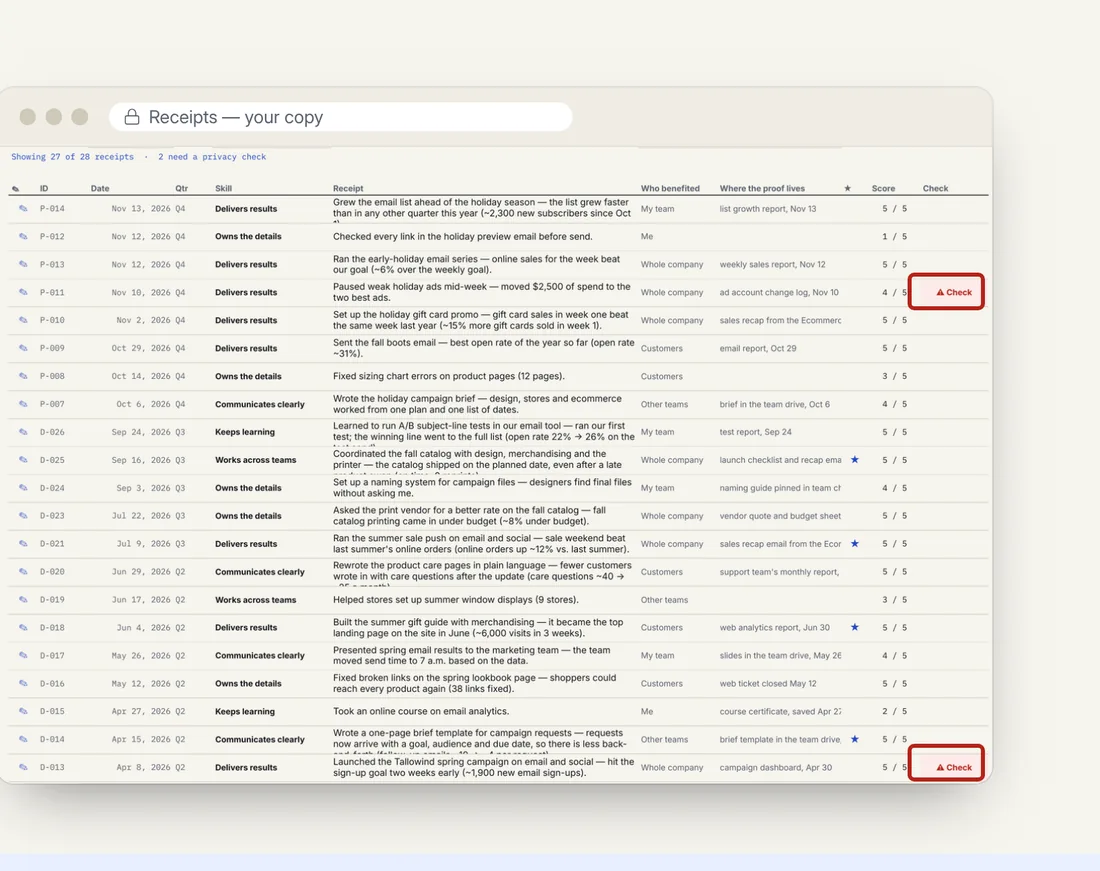
Your copy lives in your own Google Drive. I can't see it. A built-in privacy check flags email addresses, dollar amounts, phone numbers and any client or project names you mark as private, so they stay out of your draft until you clear them.
Please follow your employer's rules about work information.
Is it for you?
Made for the person being reviewed.
Receipts is for you if
- You have an annual or mid-year self-review due
- You didn't track your wins this year (most people don't)
- Your work is behind the scenes: operations, support, coordination, engineering
- You want to write your own review, with proof next to every line
It's not for
- Managers writing reviews for their team
- HR teams looking for company review forms
- People who want a tool to write the review for them
- Anyone who needs an Excel, Numbers or Notion file
Compared with
Why not a blank doc or a free tracker?
| Receipts | A basic win tracker | A blank doc | |
|---|---|---|---|
| Finds wins you didn't log | ✓90-minute guided rebuild | Only if you logged all year | — |
| Uses your company's skills and rating words | ✓Up to 10 skills, your labels | — | — |
| Shows where your proof is thin | ✓Heat map by skill and month | — | — |
| Turns hard-to-measure work into numbers | ✓6 careful calculators | — | — |
| First draft within your form's limit | ✓From your own lines | — | — |
| Manager one-pager and meeting prep | ✓Included | — | — |
| Cost | USD 15, onceNo subscription | Free to a few dollars | Free, plus a long night |
Get Receipts
One payment. Yours to keep.
Receipts — the Review-Season System
Google Sheets + phone form + 2 PDFs
Instant download after payment.
Launch price through January 15, 2027. On January 16 the price goes up.
Sales tax may be added at checkout, depending on where you live.
Google Sheets, not Excel. You need a free Google account and a computer for setup.
It works, or I fix it.
If a file or link doesn't work, or something isn't as described, message me within 14 days of purchase. I'll fix it within 2 business days, or refund you in full.
Right after you buy
- Download the Start Here PDF.
- Click "Copy my Receipts". Google makes your private copy.
- Set up in 10 minutes, then start the Rebuild.
Safe checkout
Payment is handled by Payhip (Stripe) or Etsy. I never see your card details. Questions first? Email [email protected].
Questions
Good to know before you buy.
Is this an Excel file?
No. Receipts is a Google Sheets file. You need a free Google account. It won't work in Excel, Numbers or Notion.
Does it write my review for me?
No. Receipts builds a first draft only from lines you wrote, then you rewrite it in your own words. Your review sounds like you because it comes from you.
Can't I just ask a writing tool to do it?
A writing tool can polish sentences, but it can't remember your year. Receipts gets the facts out of your own calendar, mail and files first, with a number next to each. After that, finish the words however you like.
I had a rough year. Will it still help?
Yes. The Rebuild often turns up more than you remember, and the Map shows which skills have real proof, so you can lead with them. Meeting prep also helps you name one growth area and what you're doing about it.
My review is due this week. Is it too late?
No. That's why the Rebuild takes 90 minutes. Plan one evening for setup and the Rebuild, and the next day for the draft.
Can you see my data?
No. Your copy lives in your own Google Drive. There are no add-ons or scripts, and nothing is sent to me.
My company uses its own skills and rating scale. Will it fit?
Yes. Up to 10 skills and your own rating labels go in Setup, or pick a preset. Choose a 12-month or 6-month period.
Can I use it on my phone?
Yes, for logging wins with the phone form and viewing your file in the Google Sheets app. Set up and draft on a computer.
My work laptop blocks Google. What can I do?
Use your own device, if your employer allows it. Or use the printable workbook.
How do I get my draft into my company's review tool?
Copy it from Receipts and paste it into your form, whether that's Workday, Lattice or a document from HR. Receipts doesn't connect to your company's tool. If the form has a character limit, the Limit Ruler in Setup shows you where it is.
Does it work for mid-year reviews?
Yes. Switch Setup to the 6-month period.
Will this get me a better rating or a raise?
No tool can promise that, and I won't. Receipts helps you show your work clearly and completely. The rating depends on your work, your manager and your company.
Where do I get the files after I buy?
Right after payment. On Etsy: You → Purchases. On Payhip: the download page and the email with your link. You can download again anytime.
What if it doesn't work for me?
My voluntary guarantee: if a file or link doesn't work, or something isn't as described, message me within 14 days. I'll fix it within 2 business days, or refund you in full. Digital downloads are otherwise final sale.
Review season
Your review is due either way. Walk in with receipts.
90 minutes to rebuild your year. A first draft the next day. One payment of USD 15.
Launch price through January 15, 2027 · Fix-or-refund guarantee

Made by Evenwell Lab
Evenwell Lab is one independent maker in Winnipeg, Canada. Not a big company and not HR. Every tool is a real file: what you see on this page is what you get.
Questions before you buy? Email [email protected]. I usually reply within 24 hours.